
InCoder

From idea to APK

Plant a seed of an idea. Watch it grow into a full Android app.

Idea
→
Code
→
Build
→
APK
MainActivity.kt — InCoder Cloud IDE
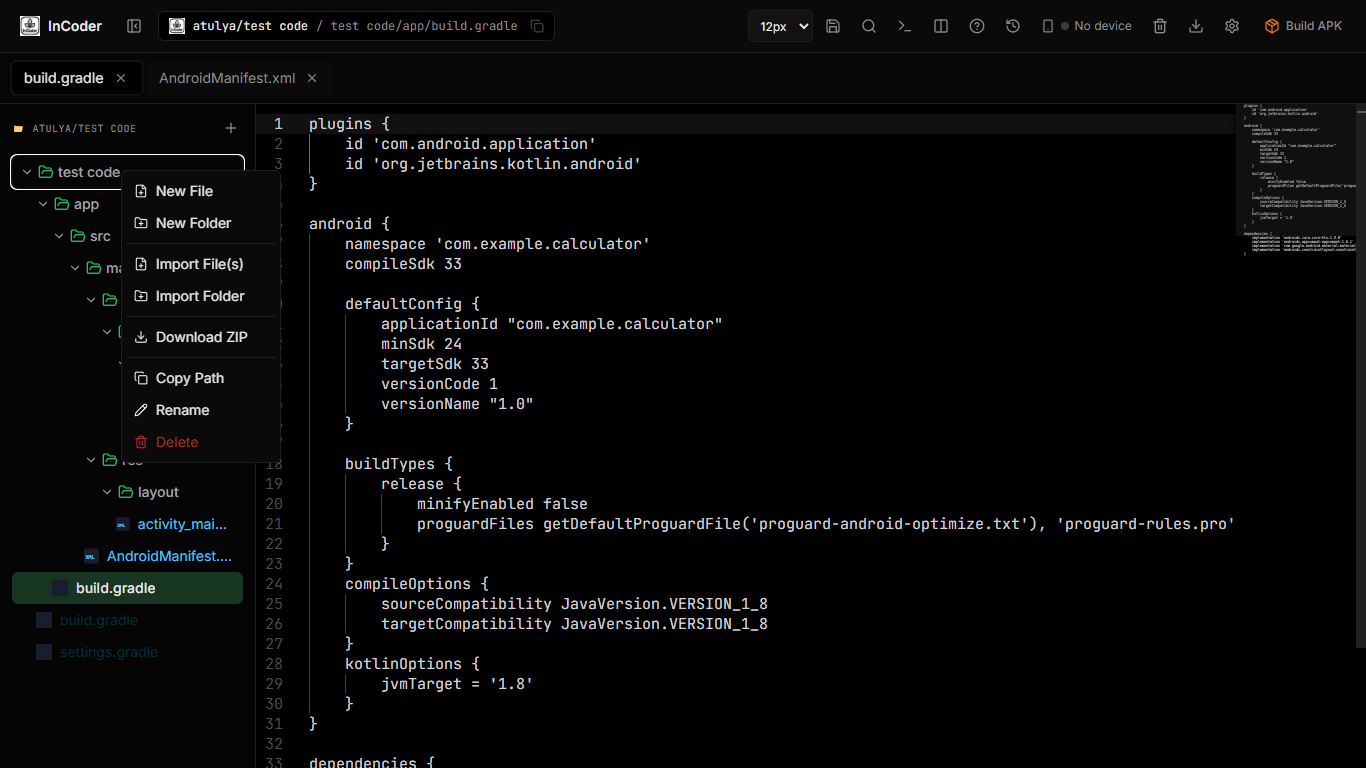
InCoder Cloud IDE Interface

InCoder enables users to bypass heavy local Android Studio setup by providing a complete, browser-based cloud IDE, eliminating configuration and hardware limitations.

0MB
To Download
0min
Avg Build Time
0AI
Models Available
₹0
To Get Started

Trusted by developers from

🇮🇳 IITs • 🎓 NITs • 💻 Bootcamps • 🚀 Indie Devs • 🏫 Universities

"My laptop couldn't even open Android Studio without lagging. With InCoder, I built and published my first Android app straight from the browser."

AG
Adarsh Giri
Student
FEATURES

Three-stage AI.
Not just autocomplete.

Planner designs. Code Writer builds. Debugger fixes. All three share one credit. You choose GPT-4o, Gemini, or Claude per request.

Planner and Debugger are toggleable per prompt.
Stage 01

Planner

Reads your prompt and designs the full app architecture — file structure, activities, navigation — before a single line is written.

Open-source models
Stage 02

Code Writer

The main model. Writes full Kotlin/Java/XML across all files. Handles activities, layouts, Firebase integration, and MVVM architecture.

GPT-4o / Gemini Pro / Claude Sonnet
Stage 03

Debugger

Checks every line. If errors found, resends to Code Writer with full context. Loop continues until completely clean. Zero broken builds.

Open-source models
1 credit shared

One credit powers all three stages — Planner, Code Writer, and Debugger — in a single generation cycle. No per-stage billing.

Context-aware

AI knows your project before every session. Reads your package, activities, and architecture automatically.

AI that knows
your entire project.

Most AI tools write generic code. InCoder reads your project structure, dependencies, and architecture before every chat session. The result? Code that actually fits your codebase.

1

Project Scan on Import

When you open or import a project, InCoder analyzes all files and generates a compact context summary. This happens automatically — no setup needed.

2

Smart Context Window

First message includes full project context. Follow-ups use chat history + only newly relevant files. Dramatically cheaper and more accurate than resending everything.

3

Sliding Summarization

After every 5-6 exchanges, old messages are compacted into summaries. Your context window stays small regardless of conversation length.

Code to APK in 5 Steps

No setup. No configuration. No hardware limits.

1

Open Browser

Go to incoder.in on any device. All modern browsers supported.

2

Create Project

Choose Android, Python, Web, or Rust. Or import an existing project.

3

Write or AI

Code in the editor or chat with AI to generate full apps automatically.

4

Build APK

Click build. The cloud compiles with live logs streaming to your screen.

5

Download & Ship

Get signed APK + keystore. Upload directly to Google Play Store.

See the Magic Happen

Watch your code transform into a real Android, Python, or Web app in real-time. Live build logs, instant error detection, one-click downloads.

Your code.
Your keystore. Forever.

No lock-in. No hidden clauses. We build the tool. You own everything that comes out of it.

Your Keystore, Forever

Database Isolation

Zero Bandwidth Fees

One editor.
80+ languages.

From Android native to systems programming. All in the same editor you already know.

Android Native

Kotlin, Java, XML
Full Gradle builds

Python

In-browser execution
+ Cloud runtime

Web Stack

HTML, CSS, JS
React, Vue, TypeScript

Systems

Rust, C, C++
Go, Zig, Dart

And 70+ more languages supported with full syntax highlighting and IntelliSense.

More is growing.

InCoder is expanding beyond Android. These capabilities are on the roadmap and will arrive progressively.

</>
Coming soon

Frontend Development

Build and preview modern frontend projects directly in the cloud, without installing a local development environment.

◎
On roadmap

Visual App Building

A more visual workflow for turning ideas into interfaces, components, and working application screens.

→
On roadmap

Bigger Cloud Workflows

More project types, smoother previews, and a broader cloud development workflow as InCoder evolves.

ROADMAP • BUILDING IN PUBLIC • MORE CAPABILITIES AHEAD

Why InCoder?

Feature InCoder Firebase
Browser-based ✓ Yes ✓ Yes
Build real APK ✓ Yes ✗ No
APK Signing + Keystore ✓ Yes ✗ No
3-Stage AI Pipeline ✓ Planner + Coder + Debugger Basic
Context-Aware AI ✓ Full Project Context Limited
Works on 4GB RAM ✓ Yes ✓ Yes
India Pricing (INR) ✓ Yes ✗ USD

Plans for Every Developer

Start free, upgrade when you need more power.

Free

₹0
/month
Click for details

✓ 2 CPU Cores, 5 GB RAM

✓ 2 GB Storage

✓ 2 Android Projects

✓ 2 builds/day, 10 builds/month

Advance

₹599
/month
Click for details

✓ 4 CPU Cores, 8 GB RAM

✓ 5 GB Storage

✓ 5 Android Projects

✓ 3 builds/day, 30 builds/month

POPULAR

Pro

₹1,799
/month
Click for details

✓ 6 CPU Cores, 12 GB RAM

✓ 12 GB Storage

✓ 10 Android Projects

✓ 5 builds/day, 50 builds/month

Researcher

₹5,999
/month
Click for details

✓ Max 8 CPU Cores, 16 GB RAM

✓ 30 GB Storage

✓ 30 Android Projects

✓ 10 builds/day, 200 builds/month

How many builds can run at once

10
Free
25
Advance
50
Pro
90
Researcher

Concurrent builds, per tier. Go over your limit and the next build queues automatically instead of failing — nothing is dropped. These ceilings rise as the user base grows.

Questions?

How can I enter full screen?

Press F11 on Windows to toggle full screen. On Mac, press Control + Command + F.

Do I need Android Studio installed?

No. InCoder runs entirely in your browser. We handle compilation, the Android SDK, and Java — all in the cloud. Your laptop only needs a browser and an internet connection.

Can I import my existing Android Studio project?

Yes. Drag and drop your project folder, browse your local files, or upload a ZIP. InCoder recreates your file structure instantly and AI learns your codebase on import.

What happens to my APK after 24 hours on the Free plan?

Free plan APKs are retained for 24 hours. Advance: 7 days. Pro: 30 days. Researcher: 90 days. We recommend downloading immediately. Your keystore is stored permanently regardless of plan.

Is my keystore safe? Can you access it?

Your keystore is stored encrypted in secure cloud storage. We generate it, but you download and own it. Without your keystore, even we cannot sign future updates for your app. That is the point — you have full control.

Can I use my own OpenAI or Claude API key?

Pro and Researcher plans support optional personal API keys for one model (Pro) or all three (Researcher). This lets you use your own enterprise billing while still getting InCoder's context system and pipeline.

Why do GPT and Gemini burn fewer credits than Claude?

GPT-4o and Gemini Pro are more token-efficient for our use cases. We pass that efficiency to you as a 20% credit bonus. Claude burns at 1.0x because it produces longer outputs. You choose per request based on your preference.

What languages besides Android are supported?

All plans include Android (Kotlin/Java/XML) and Python. Advance adds Web (HTML/CSS/JS). Pro and Researcher unlock all 80+ editor-supported languages including Rust, Go, C++, Dart, and more.

How much memory can I allocate to Gradle and Kotlin daemons?

To prevent out-of-memory (OOM) errors during heavy builds, we recommend these maximum JVM allocations based on your plan:
Researcher: Gradle 9GB, Kotlin 5GB
Pro: Gradle 7GB, Kotlin 4GB
Advance: Gradle 5GB, Kotlin 2.5GB
Free: Gradle 3.2GB, Kotlin 0.8GB
These are recommendations, not absolute limits. When editing gradle.properties, InCoder provides intelligent "ghost text" to automatically suggest the correct allocation limits for your plan.

Ready to Build?

Join thousands of developers building Android, Python, and Web apps in the cloud. No credit card required.

Free plan includes 300 AI credits and 10 builds. No credit card required.